
Explanatory Images and Asset Specifications
A pricing-page visual should begin with a comparison task, not an illustration request. Before choosing a format, identify what a buyer must distinguish between plans, features, limits, add-ons, or subscription conditions.
A useful pricing page explanatory image brief records that task in concrete terms. It defines what the asset must clarify, which information must remain available outside the image, how the composition changes on mobile, and what the team must verify before publishing.
The same approach can support comparison table visuals, add-on blocks, FAQ assets, and trust cues. These assets do not carry the same information. A decorative mark beside a plan name and an add-on dependency diagram require different specifications.

More specific pages
These pages continue the topic in smaller, more specific directions.
Start With the Buyer’s Comparison Task
The first brief field should describe a decision visible on the page. “Create a pricing diagram” is too broad because it does not identify the information at risk.
Use a task statement that names the relevant plan column, feature row, add-on block, FAQ answer, or adjacent section. The statement should also identify the comparison unit, such as availability, quantity, billing period, dependency, exclusion, or scope.
- Compare which features appear in each plan.
- Identify the usage limit that changes between adjacent tiers.
- Determine whether an add-on requires a particular plan.
- Distinguish included capacity from separately purchased capacity.
- Understand whether an FAQ exception changes the table’s general rule.
- Recognize what a trust cue applies to without confusing it with a plan feature.
Do not begin with icons, arrows, or an annotated screenshot. Those choices describe the presentation, not the comparison the asset must preserve.
What Belongs in the Brief
A brief-ready specification connects the buyer task to production and review requirements. The following fields give another person enough context to produce or inspect the asset without guessing.
Page Context
Name the section where the asset will appear and the content directly before and after it. State whether the image supplements a pricing table, replaces part of one, expands an add-on rule, or illustrates an FAQ answer.
Nearby text may already provide part of the explanation. Record that relationship so the asset does not silently contradict the page or introduce a second terminology system.
Comparison Objective
Write one sentence explaining what a buyer should be able to compare after reviewing the asset. Keep the objective observable.
A buyer can identify which base plans support the audit-log add-on and whether another add-on is required first.
This is more useful than “make add-ons easier to understand.” The narrower statement gives reviewers a specific relationship to inspect in the table, asset, and surrounding copy.
Information Inventory
List every plan, feature, usage limit, add-on, dependency, exclusion, and subscription condition represented by the asset. Research on SaaS pricing models provides useful vocabulary for separating these objects, but it does not prescribe how they should be drawn.
A plan inclusion, a numeric usage limit, and an optional add-on are different pricing objects. Combining them under one generic checkmark can hide the distinction a buyer needs. For technical offers, quota, rate, periodicity, and capacity may also require separate labels when the offer exposes those differences.
Required Relationships
Record the relationships that must survive every version of the asset:
- Feature included in a plan.
- Feature unavailable in a plan.
- Add-on available only with specified plans.
- Add-on dependent on another add-on.
- Add-on excluded from a particular plan.
- Usage limit measured over a stated period.
- FAQ exception applying to one tier rather than the full offer.
A relationship should not depend only on position or color. If a red line means “incompatible,” the meaning also needs a label, legend, pattern, or nearby explanation.
Visual Hierarchy
State which information must be read first, second, and third. The hierarchy should follow the buyer’s comparison sequence rather than the internal structure of the product.
- Identify the relevant plan.
- Locate the feature or add-on.
- Read the inclusion, limit, dependency, or exclusion.
- Check the associated condition or exception.
This sequence can guide headings, labels, connectors, and grouping. It also gives the mobile pass a defined reading order.
Separate Desktop Delivery From Mobile Meaning
Specify the intended desktop composition and the responsive diagram mobile fallback separately. A responsive file and a responsive explanation are different requirements.
Viewport-aware source selection and resolution variants can deliver an appropriate file for the display context. They do not establish that a dense pricing diagram remains understandable on a narrow screen.
The brief should record:
- Desktop dimensions or layout constraints.
- Available image variants.
- Intended display width at relevant breakpoints.
- Minimum acceptable label size.
- Elements that may be removed or regrouped.
- Mobile reading order.
- Fallback location.
- Information that must never be omitted.
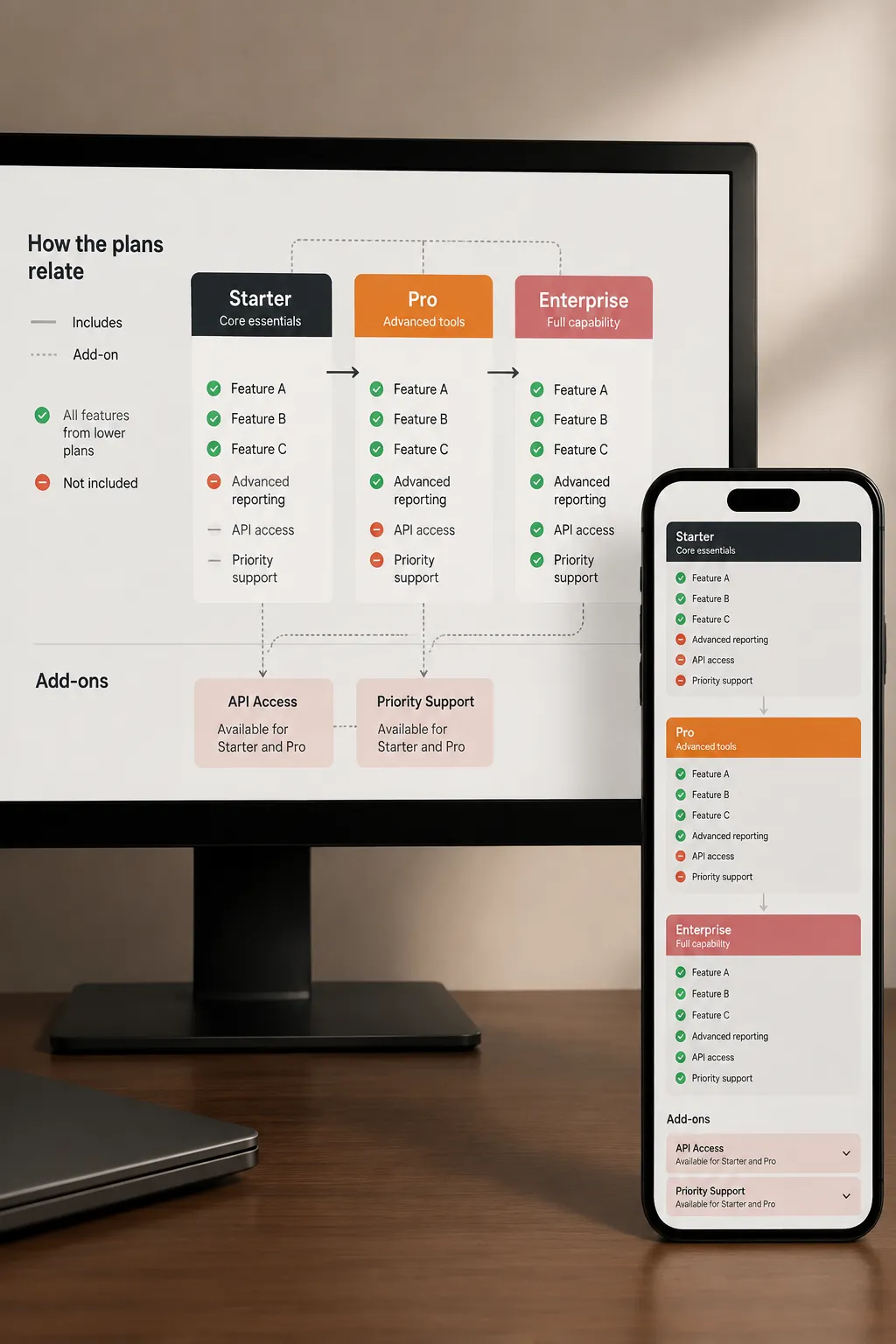
A mobile fallback might use a simplified composition, reordered text, or an equivalent explanation near the pricing table. No supplied source establishes one fallback as universally preferable. The choice depends on the comparison task and the information density on the page.
A delivery check can pass while the buyer’s task fails. Review both.
Match the Specification to the Asset Type
Different pricing-page workstreams fail in different ways. The brief should focus on the information most likely to become ambiguous for each asset.
Comparison Table Visuals
A comparison table visual may include tier cues, feature icons, annotations, grouped feature families, or expanded explanations. Its purpose is to preserve distinctions across plan columns and feature rows.
Specify:
- Which plan columns are being compared.
- Which feature groups control the scan order.
- What each icon, pattern, or annotation means.
- How included features differ from limited features.
- Where quantities and measurement periods appear.
- How exceptions connect to the correct row.
- What happens when columns collapse on mobile.
Avoid using the same checkmark for “included,” “available with a limit,” and “available as an add-on.” The shortcut reduces visual variation but erases pricing distinctions.
During a mobile pricing-table review, inspect whether the plan name remains associated with every value. A stack of detached feature values is not enough. The buyer must still know which plan, feature, quantity, and condition belong together.
Add-On Blocks and Dependency Diagrams
An add-on block becomes difficult to scan when eligibility, dependency, exclusion, and price context appear as one paragraph. An add-on dependency diagram can separate these relationships, but only if the brief defines them first.
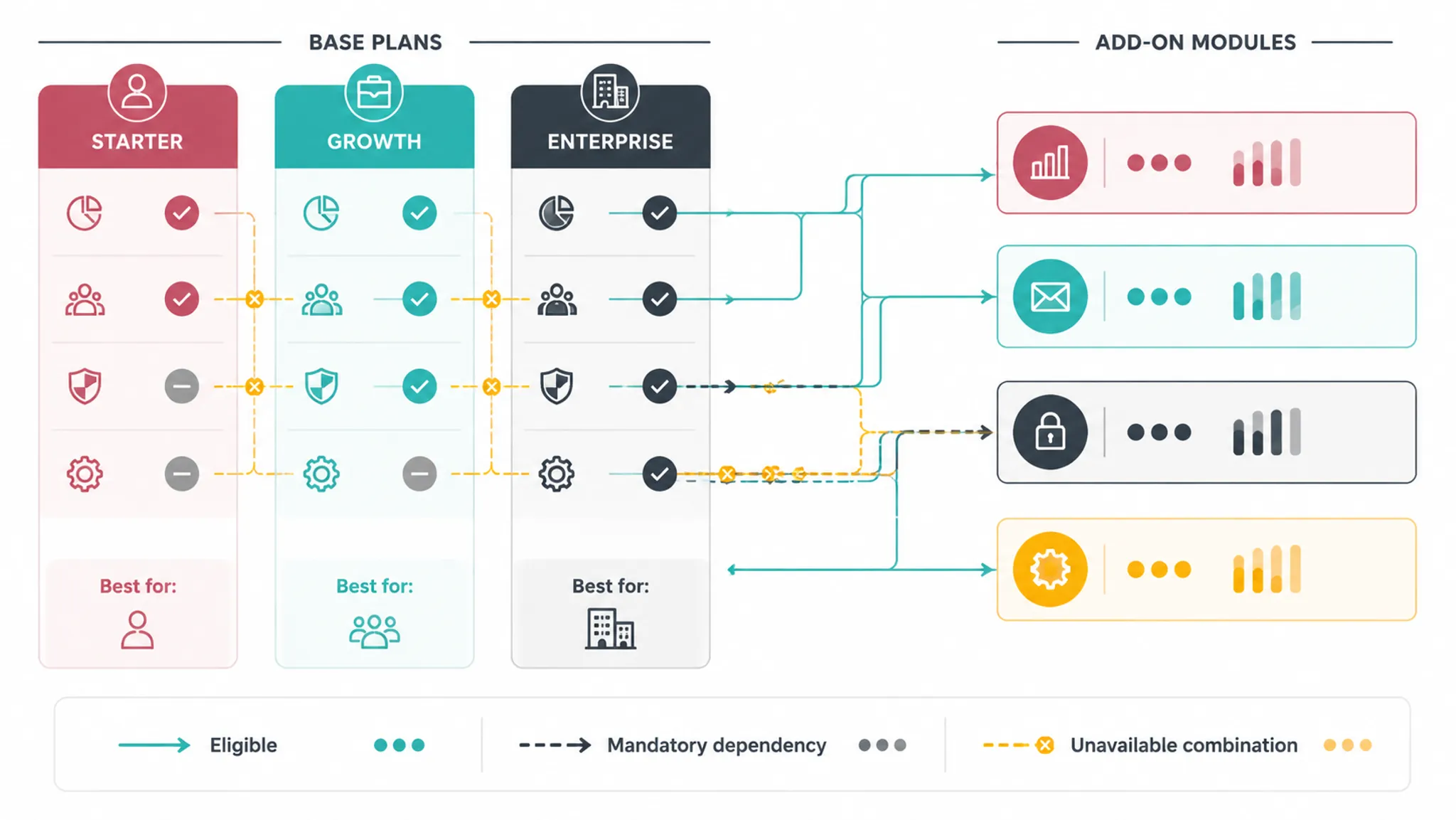
Brief a SaaS Pricing Page Add-On Dependency Diagram
Start with a bounded statement:
Show which base plans allow each add-on, which add-ons require another purchase, and which combinations are unavailable.
Inventory the objects:
- Base plans.
- Add-ons.
- Required add-ons.
- Excluded combinations.
- Applicable account or subscription conditions.
- Any usage limit relevant to the dependency.
Define a syntax before production. Solid connectors might indicate eligibility, while labeled connectors identify a dependency. Do not rely on connector style alone; record each relationship in text as well.
The specification should answer:
- Can an add-on be purchased without a base plan?
- Is the dependency mandatory or merely recommended?
- Does eligibility change by tier?
- Does one add-on exclude another?
- Is the rule account-wide or limited to certain users?
- Is the add-on included, available, or separately priced?
- Does an FAQ modify the rule shown in the diagram?
Keep the source wording aligned across the diagram, pricing table, and FAQ. “Requires Business” and “available on Business” can describe different conditions. The brief should not treat them as interchangeable.
Mobile Fallback for a Dependency Diagram
A desktop node-and-connector layout may become difficult to scan when reduced. Serving a smaller version of the same composition can preserve pixels while losing labels and relationships.
A mobile specification can instead require:
- One add-on per grouped section.
- Eligible plans listed directly below its name.
- Dependencies written as labeled statements.
- Exclusions separated from requirements.
- A stable reading order matching the desktop meaning.
- A nearby text explanation containing every essential relationship.
During the mobile pass, compare the fallback against the relationship inventory. Every required plan, dependency, and exclusion should remain present, even when the composition changes.
FAQ Assets
An FAQ asset should clarify an answer that benefits from a visual relationship, sequence, or boundary. It should not repeat a simple sentence as decoration.
Suitable tasks may include:
- Showing how an account-level limit is shared.
- Distinguishing base-plan access from add-on access.
- Explaining the order of a plan and add-on selection.
- Locating an exception within a broader pricing rule.
Record which sentence in the FAQ remains authoritative. If the image and answer are revised separately, the brief should identify who verifies that they still match before publishing.
On mobile, inspect whether the asset remains close enough to the relevant answer. An illustration separated from its heading or collapsed under another question can lose its context.
Trust Cues
Trust cues may include security marks, customer marks, review graphics, or short evidence-related annotations. Their specification should state what the cue refers to and where its supporting information comes from.
Do not let a cue visually attach itself to the wrong claim. A mark placed inside one plan column may appear to describe that plan alone, even when it applies to the product more broadly.
For each trust cue, record:
- The exact subject of the cue.
- Whether it applies to one plan, several plans, or the full offer.
- The approved label.
- The source asset and provenance.
- Required usage conditions.
- The nearby text that provides context.
- The mobile placement.
The review concerns visible scope and source records. A trust cue does not establish a business outcome or broader authority.
Specify Image Purpose and Text Alternatives
Image classification should reflect the asset’s function on the page, not its file type. Guidance from W3C WAI distinguishes informative, decorative, functional, and complex image purposes. That classification changes what the specification should request.
Decorative Images
A decorative image contributes no pricing information and performs no interface function. Its removal would not change the comparison task.
The brief can identify it as decorative and require that it not introduce unexplained labels, symbols, or product states. An image stops being purely decorative when buyers must inspect it to understand a plan difference.
Informative Images
An informative image communicates a concise fact or concept. Its text alternative can usually express the relevant information without reproducing every visual detail.
For an image alt text pricing page field, specify the intended meaning rather than only a filename or appearance description. “Three connected boxes” describes shapes. “Advanced reporting requires the Business plan and the Analytics add-on” conveys the pricing relationship.
Functional Images
A functional image acts as a control or command. Its accessible name should describe the action rather than the artwork. This matters when an icon opens plan detail, expands a feature group, or changes billing views.
The explanatory image brief need not absorb the full interaction specification. It should flag that the asset is functional and requires an interaction review.
Complex Explanatory Images
A complex asset contains several data points or relationships that cannot be captured in a short label. Examples include a pricing plan relationship diagram, a dense annotated comparison, or a multi-step add-on map.
For an accessible annotated diagram design, plan several layers:
- A concise identification of the diagram’s subject.
- A summary of its main comparison.
- A structured explanation of plans and relationships.
- Equivalent information in nearby text, a list, or an appropriate table.
- A reading order that does not depend on visual position.
- Labels that remain meaningful without color.
- A mobile treatment that preserves the same distinctions.
Research involving chart users can sharpen inspection questions about overall views, readable labels, legends, scalable content, underlying data, and tooltip placement. These observations concern charts and visualization access rather than SaaS pricing pages, so they should inform checks rather than serve as direct proof about a particular pricing asset.
Ask whether the diagram’s relationships remain available beyond its visual composition. Do not assume that one short label, one color system, or one automated description can carry every relationship in a complex asset.
Keep Source Rights Records Separate
A source-rights note belongs beside the asset specification because sourcing decisions can affect modification, attribution, and publication. Do not wait until the final publishing pass to determine where an image came from.
Use separate fields for:
- Provenance: where the asset originated.
- License: the identified terms attached to that source.
- Attribution: the credit format required by applicable terms.
- Permission evidence: internal records relevant to the intended use.
- Modifications: crops, annotations, recoloring, or compositing.
- Restrictions: known limits on use, placement, or alteration.
- Review status: what has been checked and what remains unresolved.
Do not merge these fields into a single “rights cleared” checkbox. They answer different questions.
When Creative Commons material is involved, record the creator, title, source, license, and attribution details. Then verify that the selected terms apply to the exact asset and intended use. This is a practical publishing record, not a conclusion about legal permission.
The record should also cover embedded components. A diagram may be newly assembled while still containing a sourced screenshot, logo, icon set, or product image with separate conditions.

Use a Complete Specification Example
The following structure shows how the fields connect without prescribing one visual layout.
Asset
Add-on eligibility and dependency diagram.
Page Placement
Directly below the add-on summary and above the related FAQ group.
Buyer Task
Compare which plans permit each add-on and identify mandatory dependencies before selecting a configuration.
Objects Represented
- Three base plans.
- Four optional add-ons.
- One required add-on relationship.
- Two plan eligibility restrictions.
- One unavailable combination.
Required Distinctions
- Included versus separately purchased.
- Eligible versus unavailable.
- Direct purchase versus dependency.
- Plan rule versus FAQ exception.
Desktop Treatment
Group add-ons by function. Place eligible plans directly beneath each add-on. Use labeled connectors only for mandatory dependencies. Present exclusions as explicit text rather than relying on a crossed line.
Mobile Treatment
Replace the wide relationship map with one grouped section per add-on. List eligible plans, dependencies, and exclusions in that order. Preserve the terminology used in the pricing table.
Text-Alternative Intent
Treat the asset as complex explanatory content. Provide a concise subject label and a nearby structured explanation containing all eligibility, dependency, and exclusion relationships.
Source-Rights Note
Record the origin and conditions for every logo, icon, and screenshot component. Keep newly created shapes and labels under separate internal asset identifiers.
Acceptance Checks
- Every represented plan matches the pricing table.
- Every dependency is stated in text.
- No connector depends on color alone.
- Mobile sections preserve all relationships.
- Labels remain readable at rendered size.
- The nonvisual explanation uses the same plan and add-on names.
- Source and usage fields are complete before publishing.
Common Concept Mix-Ups
Responsive Image Versus Mobile Fallback
A responsive image is delivered according to display conditions. A mobile fallback is an editorial treatment that preserves meaning when the original composition no longer works.
The first is a delivery concern. The second is a comparison concern.
Alt Text Versus an Equivalent Explanation
Short alt text may identify an informative image. It may not be sufficient for a complex asset containing several plan relationships, limits, or dependencies.
The brief should state where the complete equivalent information appears. Do not force the entire diagram into one long image attribute without considering page structure and reading order.
Attribution Versus Permission
Attribution records who created an asset and how credit should appear under applicable terms. Permission depends on the actual source, license, restrictions, modifications, and intended use.
One does not replace the other.
Visual Consistency Versus Pricing Accuracy
Reusing one icon system can make rows appear consistent, but consistency does not justify merging different pricing states. Included, limited, optional, unavailable, and dependent should remain distinguishable.
Pricing accuracy comes first.
Planning Fields Versus Formal Assessment
Image classification, text alternatives, redundant encoding, responsive variants, and mobile checks are useful production requirements. Their presence in a brief does not by itself establish formal accessibility conformance.
Keep the planning claim narrow: the required information has been identified, represented, and checked in the specified page contexts.

Run the Pre-Publication Review
A final review should compare the asset against the live pricing content, not only against the design file.
Content Pass
- Plan names match across the image, table, and FAQ.
- Feature and add-on labels use one terminology system.
- Limits include the relevant quantity, unit, and period.
- Dependencies and exclusions are explicit.
- Annotations do not introduce unsupported conditions.
- Trust cues apply to the content beside them.
Desktop Pass
- The intended comparison is visible without reconstructing it from disconnected sections.
- Labels remain associated with the correct plan columns and feature rows.
- Legends and annotations do not obscure essential information.
- Color, pattern, text, and position work together rather than carrying accidental separate meanings.
- Nearby copy and the image do not conflict.
Mobile Pass
- The first visible label identifies the subject of the asset.
- The reading order follows the buyer’s comparison sequence.
- Plan and feature relationships remain available.
- Diagram labels remain legible at the rendered size.
- Horizontal movement, if retained, does not detach headers from values.
- The fallback contains every essential relationship.
- FAQ and trust-cue assets remain connected to their explanatory text.
Nonvisual Information Pass
- The image purpose is classified.
- Decorative assets do not carry essential information.
- Informative assets have concise text alternatives tied to their purpose.
- Functional assets are identified for interaction review.
- Complex assets have an equivalent structured explanation.
- The explanation preserves plan distinctions, limits, dependencies, and exclusions.
- Visual-only wording such as “the blue item on the right” is not required to understand the rule.
Source-Rights Pass
- Creator and source are recorded.
- The exact asset and license are identified.
- Required attribution is prepared.
- Modifications are documented.
- Known restrictions are recorded.
- Permission evidence is retained where relevant.
- Unresolved questions are routed for appropriate review before publishing.
Evidence Boundaries
The available reference set supports image-purpose classification, responsive delivery concepts, attribution records, SaaS pricing terminology, and bounded accessibility inspection questions. It does not directly evaluate SaaS pricing diagrams, FAQ illustrations, trust cues, mobile pricing-table fallbacks, buyer comparison outcomes, or pricing-page performance.
Research concerning charts and visualization access can inform questions about labels, legends, tooltip obstruction, redundant encoding, complementary tables, scalable output, and nonvisual structure. It should not be presented as proof that a particular pricing asset will produce a specific usability or business result.
The supplied material is discovery-level rather than a collection of verified full-text extracts. Verify exact claims and source texts before publishing. Keep recommendations grounded in observable page behavior and the team’s own review record.
When the Brief Is Ready
A pricing page explanatory image brief is ready when another person can produce or review the asset without guessing about its purpose.
- The buyer’s comparison task is stated.
- The represented pricing objects are listed.
- Essential relationships are explicit.
- Desktop and mobile treatments are separate.
- The text-alternative intent matches the image’s function.
- Equivalent information is planned for complex assets.
- Source provenance and usage fields are recorded.
- Acceptance checks refer to observable behavior on the page.
Detailed implementation can then move into asset-specific work: the exact add-on diagram layout, the comparison table’s narrow-screen behavior, the wording of a complex text alternative, or the final source-rights review. The Branch-level specification should stop before those narrow decisions become one universal rule.
Sources
- W3C WAI: Images Concepts
- MDN: Responsive Images
- Creative Commons: Recommended Practices for Attribution
- Pricing4SaaS: Towards a Pricing Model to Drive the Operation of SaaS
- Enhancing statistical chart accessibility for people with low vision: insights from a user test
- Chart Reader: Accessible Visualization Experiences Designed with Screen Reader Users